AI Portrait Photo Editing Prompt (Copy & Paste)
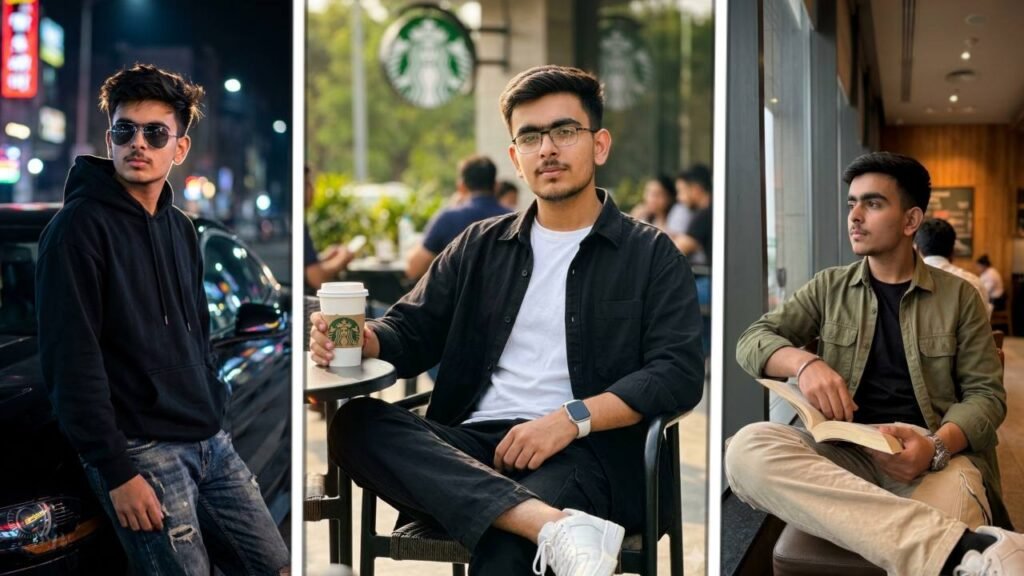
Introduction of AI Portrait Photo Editing Prompt
Artificial Intelligence has completely transformed the way we create professional-looking portraits. A few years ago, getting cinematic lifestyle photos required an expensive DSLR camera, professional lighting, and hours of editing. Today, AI can generate the same premium-quality images within seconds using only a well-written prompt.
If you have ever wanted photos that look like they were captured in a luxury café, beside a premium car at night, or inside a stylish coffee shop, then this AI Portrait Photo Editing Prompt is exactly what you need. With modern AI image generators like ChatGPT, Gemini AI, and other advanced AI tools, anyone can create ultra-realistic portraits without photography experience.
This guide includes everything you need—from the working prompt and customization tips to the best settings, editing tricks, and frequently asked questions. Whether you’re creating content for Instagram, YouTube thumbnails, social media branding, or simply upgrading your profile picture, this prompt helps produce realistic, cinematic, and professional results.
The best part is that the prompt is beginner-friendly. You only need to copy, paste, and replace a few personal details. AI handles the rest, delivering portraits with natural lighting, sharp facial details, realistic depth of field, and premium color grading that closely resemble professional photography.
Why This AI Portrait Photo Editing Prompt Is Trending
This particular prompt has become popular because it creates three different lifestyle looks in one image. Instead of generating a single portrait, it combines multiple premium environments, making the final image look like a luxury Instagram carousel.
The prompt is ideal for:
- Instagram Posts
- Facebook Profile Pictures
- WhatsApp DP
- LinkedIn Portrait
- YouTube Thumbnail
- Personal Branding
- Fashion Content
- Lifestyle Photography
- AI Influencer Images
- Portfolio Photos
What Makes This AI Portrait Photo Editing Prompt Special?
Unlike ordinary AI prompts, this one focuses on realism rather than fantasy. It carefully describes lighting, facial expressions, camera angles, clothing, and background composition.
The result usually includes:
- Cinematic Lighting
- DSLR Quality
- Natural Skin Texture
- Sharp Face Details
- Premium Background Blur
- Professional Color Grading
- Instagram Ready Images
- Luxury Lifestyle Feel
- Ultra Realistic Look
- High Resolution Output
Prompts (AI Portrait Photo Editing Prompt)
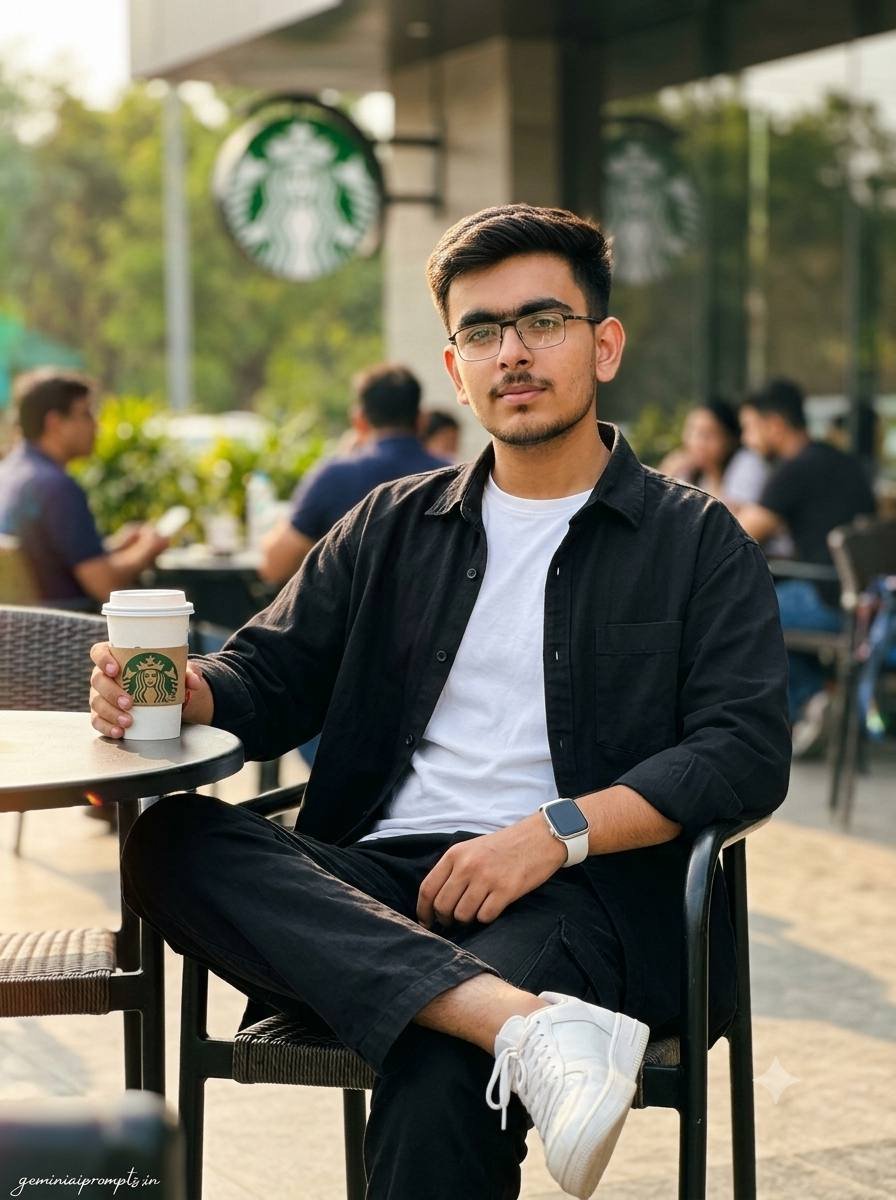
Use the attached reference image and generate the following image. Each scene must remain realistic, cinematic, and natural. His face is kept exactly true to the uploaded reference photo — every feature stays untouched, the eyes, the jawline, the beard shape, the skin tone, all preserved exactly as they are. A warm midday light is already falling across the Starbucks outdoor seating area when a stylish young Indian man enters the frame, sitting casually at a café table with his right ankle resting over his left knee. His left hand holds a Starbucks takeaway coffee cup and he looks directly into the camera with a subtle confident expression. He wears a Pinterest-inspired black oversized shirt layered over a white crew-neck t-shirt, black cargo pants, white sneakers, geometric full-rim eyeglasses and a white smartwatch. Captured on a Sony A7IV at 85mm f/1.8, the background melting into warm painterly bokeh while the iconic Starbucks green logo stays softly visible. Skin pores and imperfections, micro-textures, fine fabric weave, strands of flyaway hair, Kodak Portra 400 film tones, HDR detail, bokeh circles, lens flare artifacts, specular highlights, rule of thirds composition, authentic candid capture, ultra-realistic texturing, crisp 4K realism. Shot with premium editorial sensibility, clean and classy, platform-safe from every angle, natural skin, cinematic light quality throughout. Vertical 3:4 composition. Add “geminiaiprompts.in” as a small watermark at the bottom-left corner, Petit Formal Script font, thin elegant cursive strokes, soft white color rgba(FFFFFF), 1px letter-spacing, subtle premium handwritten signature style, slight transparency, minimal and refined, no background on text, blends naturally into the image.
Generate Image:
👉 Use ChatGPT
👉 Use Gemini AI
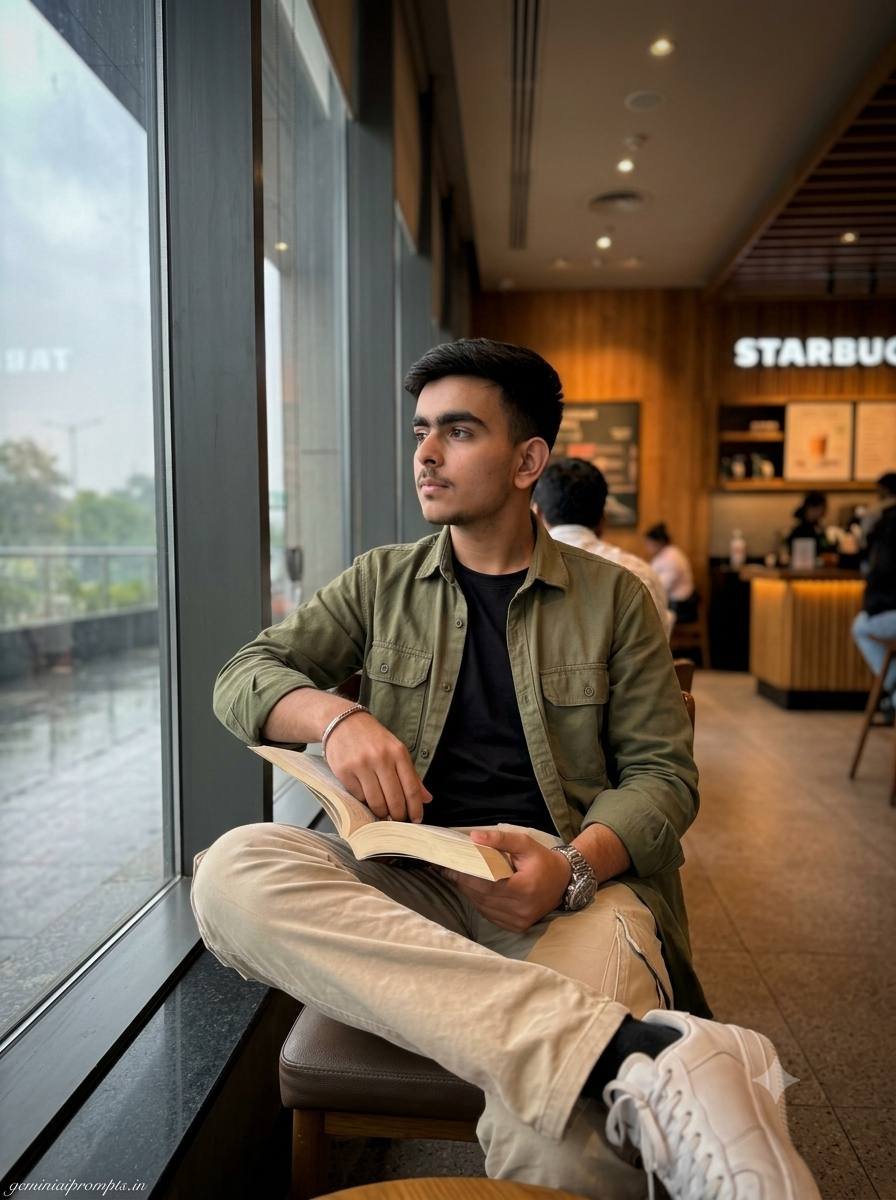
Diffused overcast light is already filtering through the wide café window when the scene opens on a Starbucks interior filled with warm ambient tones and authentic Starbucks branding softly visible on the signage behind. Facial identity matches the reference image precisely — same bone structure, same eyes, same brows, same lip shape, same complexion, nothing altered. A young Indian man sits near the window with an open book in one hand , a relaxed and thoughtful expression settling naturally across his face. He wears an olive overshirt over a black t-shirt, beige cargo pants and white sneakers, a Pinterest menswear look from 2026 that feels current without trying too hard. A7R V camera at 85mm focal length with f/1.4 wide open, global illumination, skin pores and imperfections, fabric weave detail, photorealistic render, HDR realism, bokeh circles, slight vignetting, authentic candid capture, physically based rendering, environmental depth, realistic coffee shop textures, Instagram-ready composition. Luxury lifestyle editorial look throughout, tasteful and classy in every detail, platform-safe styling, cinematic light and natural skin tone. Vertical 3:4 composition. Add “geminiaiprompts.in” as a small watermark at the bottom-left corner, Petit Formal Script font, thin elegant cursive strokes, soft white color rgba(FFFFFF), 1px letter-spacing, subtle premium handwritten signature style, slight transparency, minimal and refined, no background on text, blends naturally into the image.
Generate Image:
👉 Use ChatGPT
👉 Use Gemini AI
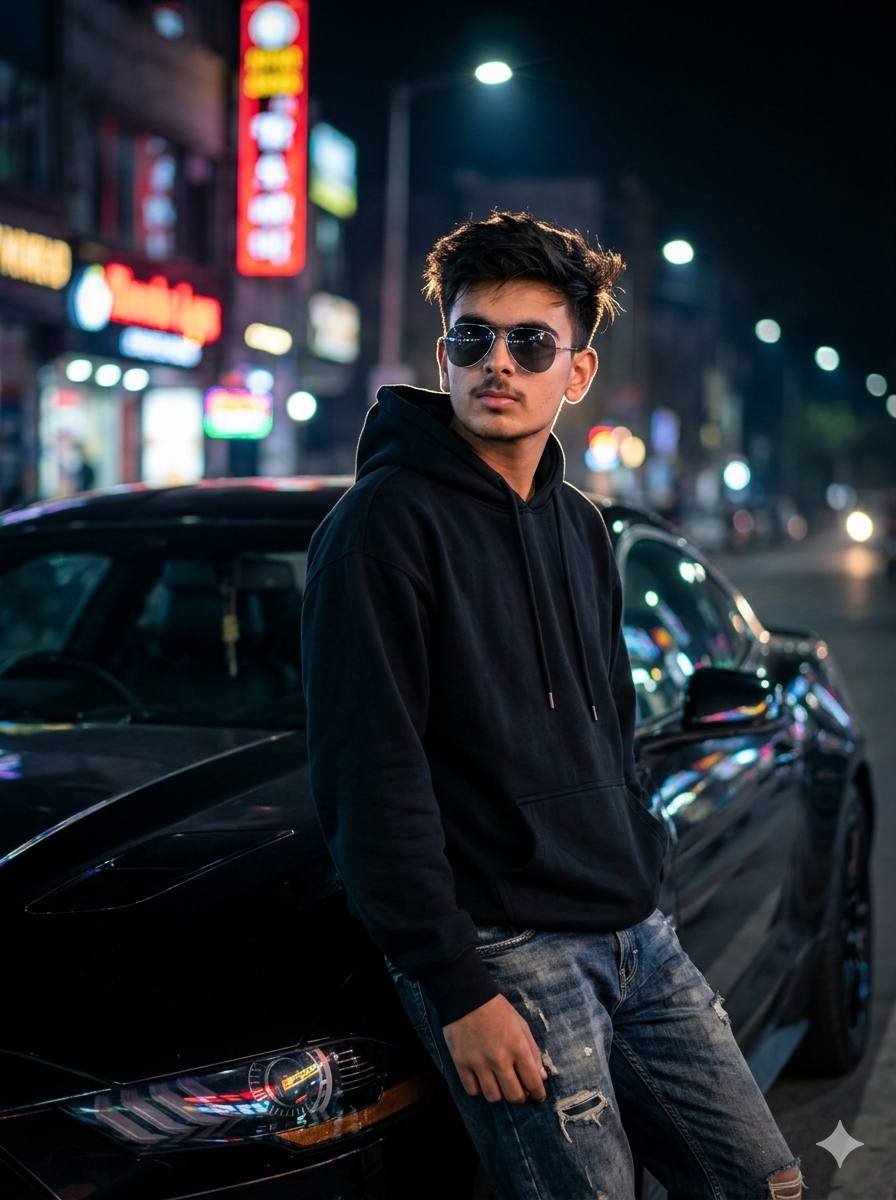
A hyper-realistic, 8k resolution fashion portrait of a handsome young man with sharp defined jawline, wearing a modern fitted black oversized hoodie, distressed denim jeans, and aviator sunglasses. Posing casually against a luxury sports car on an urban street at night. Background features colorful neon lights creating a blurred bokeh effect. Rim lighting around his tousled hair, cinematic lighting, moody and dramatic luxury vibe, shot on an 85mm lens, shallow depth of field
Generate Image:
👉 Use ChatGPT
👉 Use Gemini AI
Prompt Source: https://auraprompt.in/starbucks-coffee-photo-prompt-for-boys/
How to Use This AI Portrait Photo Editing Prompt
Using this AI Portrait Prompt is incredibly simple.
Step 1(AI Portrait Photo Editing Prompt)
Copy the entire prompt.
Step 2(AI Portrait Photo Editing Prompt)
Open your preferred AI image generator.
Step 3(AI Portrait Photo Editing Prompt)
Upload your selfie if the tool supports image reference.
Step 4(AI Portrait Photo Editing Prompt)
Paste the prompt.
Step 5(AI Portrait Photo Editing Prompt)
Replace details like:
- Clothes
- Hairstyle
- Background
- Accessories
- Pose
- Camera Angle
Step 6(AI Portrait Photo Editing Prompt)
Click Generate.
Within seconds, you’ll receive highly realistic cinematic portraits.
Best AI Tools to Generate These Portraits
Several AI platforms support advanced portrait generation. Popular choices include ChatGPT Image Generation, Gemini AI, Flux AI, Midjourney, Ideogram AI, and Recraft AI. Each tool interprets prompts slightly differently, so experimenting with prompt wording can improve your results.
Customization Ideas
You can personalize the prompt by changing:
Outfit(AI Portrait Photo Editing Prompt)
- Black Hoodie
- Oversized Shirt
- Formal Suit
- Leather Jacket
- Casual T-shirt
- Denim Jacket
Background(AI Portrait Photo Editing Prompt)
- Starbucks
- Luxury Café
- Tokyo Street
- Dubai Skyline
- Lamborghini Garage
- Library
- Airport Lounge
- Mountain View
- Beach
- Rooftop
Lighting(AI Portrait Photo Editing Prompt)
- Golden Hour
- Sunset
- Blue Hour
- Neon Night
- Studio Light
- Soft Window Light
Camera(AI Portrait Photo Editing Prompt)
- Sony A7IV
- Canon R5
- Nikon Z8
- 85mm Lens
- 35mm Lens
- Portrait Lens
Tips for Better Results
For the most realistic images, use a high-quality reference photo with a clear face and good lighting. Avoid heavy filters on your original selfie, as they can confuse the AI model. Keep the prompt specific by mentioning the outfit, background, mood, and camera style. Small adjustments often produce significantly better results than rewriting the entire prompt.
Who Can Use This Prompt?
This prompt is suitable for:
- Students
- Instagram Creators
- Influencers
- Freelancers
- Bloggers
- YouTubers
- Professionals
- Content Creators
- Photographers
- Business Owners
Benefits of AI Portrait Editing
Traditional photoshoots require expensive equipment and editing software. AI portrait generation saves both time and money while still delivering professional-quality results. You can experiment with multiple outfits, locations, and lighting setups without leaving your home. It also allows creators to maintain a consistent visual style across social media profiles.
Common Mistakes to Avoid
Many users receive poor AI results because they use vague prompts. Mentioning detailed clothing, lighting, facial expressions, and camera settings usually improves image quality. Another mistake is uploading blurry selfies. Always use a high-resolution image with your face clearly visible.
Frequently Asked Questions
Is this AI Portrait Prompt free?
Yes. The prompt itself is completely free to use. Some AI image generators may require a paid subscription for high-resolution outputs.
Which AI tool gives the best results?
Most modern AI image generators produce excellent portraits, though results vary slightly depending on the model and settings.
Can I use these images on Instagram?
Yes. AI-generated portraits are commonly used for Instagram posts, profile pictures, and personal branding.
Can I customize the clothes?
Absolutely. You can modify outfits, accessories, hairstyles, colors, and backgrounds directly in the prompt.
Will the images look realistic?
With a detailed prompt and a clear reference photo, the generated portraits can closely resemble professional DSLR photography.
Final Thoughts
AI portrait generation has made professional photography more accessible than ever. Whether you want a stylish café portrait, a cinematic night street shot, or a cozy indoor reading pose, a well-crafted prompt can produce impressive results in just a few seconds. By customizing the clothing, environment, lighting, and camera details, you can create unique images that match your personal style and stand out on social media. As AI models continue to improve, these prompts will become even more powerful, making it easier for anyone to create premium-quality portraits without expensive gear or editing skills.