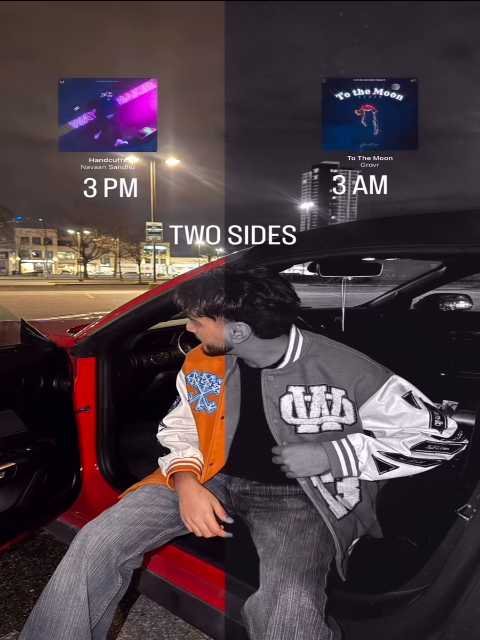
Two Sides CapCut Template is a viral trend that is currently popular on social media. In this editing style, your photo is divided into two parts. Each side of the video plays a different song and shows a different mood.
On one side, your photo appears with a normal song, while the other side shows a romantic or love song. Many creators are making this type of video using their own photos and sharing it on platforms like Instagram Reels, YouTube Shorts, and TikTok.
In this article, we will explain how you can create this trending two-sided video using a CapCut template. If you follow the steps carefully, you will easily be able to create this effect with your own photo.
Full Breakdown of This Editing
As mentioned earlier, this editing uses a two-side video effect. Your photo is divided into two sections.
- One side plays a normal song.
- The other side plays a romantic song.
Lyrics of both songs appear on their respective sides of the video.
At the start of the video, half of your photo appears on one side, while the other side remains black. A song plays along with the visible part of the photo.
After the first song finishes, your photo appears on the other side (the black part), and a new song begins there. A black-and-white filter is also applied to the photo to give the video a stylish look.
To create this effect, we will use a CapCut template. The template will automatically apply all the effects. You only need to add your photo and export the video.
CapCut Trend Templates
Many trending templates are available on CapCut, and this Two Sides Template is one of the most viral ones right now.
Using a template makes editing very easy because most of the work is already done. You only need to add your photo or clip.
Which Type of Photo Should You Use?
For this template, you need a good aesthetic photo.
Here are some suggestions:
- Use a mirror selfie
- Use a full-body photo
- Your face should not be clearly visible
- You can turn your face to the side
- Aesthetic or stylish photos work best
Most people on social media are using mirror selfies or aesthetic photos, and their videos look very attractive. You can also use the same type of photo to get a better result.
Two Sides CapCut Template Link 2026
Note: Sometimes CapCut templates may not open in some regions due to app restrictions. If the template button does not work, try opening it again later or open it directly from the CapCut application.
The external link will open the original CapCut template in a new tab. We are not affiliated with CapCut. All rights belong to their respective owners. We only share the template links for user convenience.
VN Code
If the CapCut template does not work in your region, you can also use the VN Code.

- Save This VN Code
How To Use Two Sides CapCut Template
If you want to use the template but don’t know the process, follow these simple steps:
- Click the Check Template button.
- The template will open in the CapCut application.
- If CapCut is not installed on your phone, install the official CapCut app first.
- After opening the template, you will see a preview of the video.
- Click the Use Template button.
- Your phone gallery will open to add photos or clips.
- Select the required photos.
- Click the Next button.
- CapCut will automatically edit your video.
- Wait for a few seconds until the editing is completed.
- Finally, click the Export button to save the video.
Your two-sided video will be ready automatically.
Conclusion
Now you have learned everything about Two Sides CapCut video editing. By following this simple process, you can easily create your own trending video.
This editing style is becoming very popular on social media. Many creators are using it to make viral videos. If you credit the original source or template, your video may also reach more people.
On our website, we regularly share new trending video editing templates and tutorials, so keep visiting to learn more creative editing techniques.