Mahadev Hand Trending Video Editing: Hello friends! Nowadays, many types of AI-generated videos are going viral on social media. People are creating amazing visuals using AI tools and sharing them online. One of the most popular trends right now features Lord Shiva walking forward with a trident in one hand while holding the viewer’s hand with the other, with a vast ocean in the background.
This type of video looks extremely realistic and visually impressive, which is why it’s gaining so much attention online. With Maha Shivratri approaching, these Lord Shiva themed videos have already started trending.
In this guide, I’ll explain the complete editing process step-by-step. If you follow the instructions carefully, you’ll easily be able to create your own AI video without facing any issues.
Breakdown of the Mahadev Hand Trending Video Editing
Let’s understand how this AI video is created.
In this trend, Lord Shiva appears in his Rudra form, walking forward while holding the viewer’s hand. After a few moments, the scene changes and shows the perspective from the front, as if Lord Shiva is guiding us ahead. This transition makes the video feel more cinematic and emotional.
Although this concept is currently popular for Shivratri, you are not limited to creating it only with Lord Shiva. You can recreate the same style with any deity or character you prefer—just adjust the prompt accordingly.
To complete this editing, we will use one of our own photos. The entire process is divided into two main steps:
- First, we will generate the required AI images.
- Then, we will convert those images into a video.
Step 1: Generating the Images
The first step is to create the AI images that will be used in the video.
I have provided the image prompts in this article. Follow these steps:
- Copy the first image prompt.
- Click on the “Create Image” option and open ChatGPT.
- If you prefer, you can also use Gemini—both tools produce similar results.
- Paste the prompt into the AI tool and generate an image of Lord Shiva with two hands.
Next:
- Copy the second image prompt.
- Paste it into ChatGPT again.
- Click the plus (+) icon and upload one of your own photos.
- Generate the second AI image.
By following these steps, you will successfully create both images needed for the edit.
In the next step, we will use these images to generate the AI video
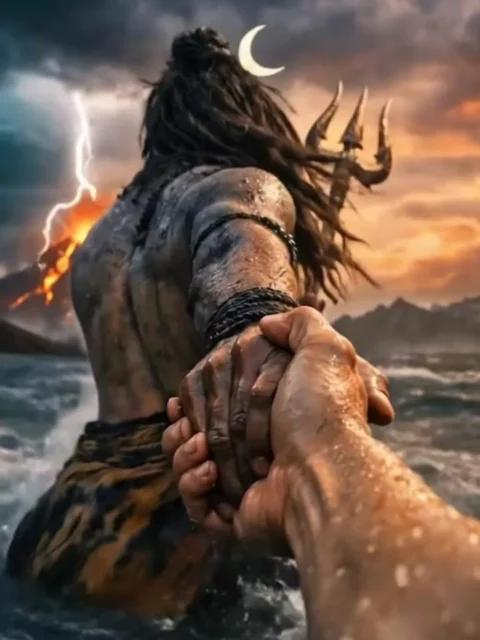
A cinematic mythological scene from a first-person POV, Lord Shiva standing in a raging ocean during a cosmic storm, Shiva holding the viewer’s hand and pulling them forward, viewer's hand like modern human hand eith no wearings and slim hand, lord shiva's powerful muscular arm in focus, wet skin texture with detailed veins, ash-smeared body, long matted hair flowing in the wind, trident (Trishul) holding in his another hand, crescent moon in his hair, tiger-skin cloth around waist, and he is only visible from back side. Massive waves crashing around, dark storm clouds, lightning striking the sky, glowing volcanic mountain erupting in the background, dramatic orange and purple sky, epic scale, divine aura, godly presence.Ultra-realistic, cinematic lighting, shallow depth of field, motion blur on water, high contrast, volumetric fog, hyper-detailed skin and environment, image in 9:16 ratio, 8K, photorealistic, movie still, epic fantasy realism.
Note: Some CapCut templates may not open in certain regions due to the app’s own restrictions. If the template button doesn’t respond, please try again later or open it directly from the official CapCut app. This external link opens the original CapCut template in a new tab. We are not affiliated with CapCut; all rights belong to their respective owners, and we only provide links for user convenience.