Car AI Video Editing – Create a Viral Car Scene Using AI : Hello friends! I hope you’re doing well. Recently, you might have seen a viral video where a boy is standing on a road, and suddenly he gets into a car and drives away in a very cinematic style. This type of video is trending everywhere on social media right now.
The interesting part is that these videos are not always filmed in real life. Many of them are actually AI-generated videos created from a single image. Yes, that’s right! With the help of AI tools, you can turn a simple photo into a realistic video where it looks like you are getting into a car and driving away.
The final result looks so real that most people cannot even tell whether it’s real footage or an AI-generated clip. In this article, I will explain how you can create the same viral-style video step by step using AI tools.
Details of Car AI Video Editing
Details of Car AI Video Editing: Let’s understand how this editing style works.
In this type of video, AI technology is used to convert an image into a short cinematic video. AI has made content creation extremely simple. Today, you can generate images, animations, and even realistic videos just by using text prompts or photos.
In this particular example, the video begins with a normal scene where a person is standing on a road. After a moment, a car appears, the person enters the car, and then drives away smoothly. The motion, lighting, and environment look very realistic, almost like a professionally filmed scene.
Because this type of content is still new, only a small number of creators are making these videos. That’s one reason why these clips are quickly going viral on platforms like Instagram Reels, YouTube Shorts, and TikTok.
If you create a video like this now, there is a good chance that your content may attract a lot of attention because viewers find these AI transformations very interesting.
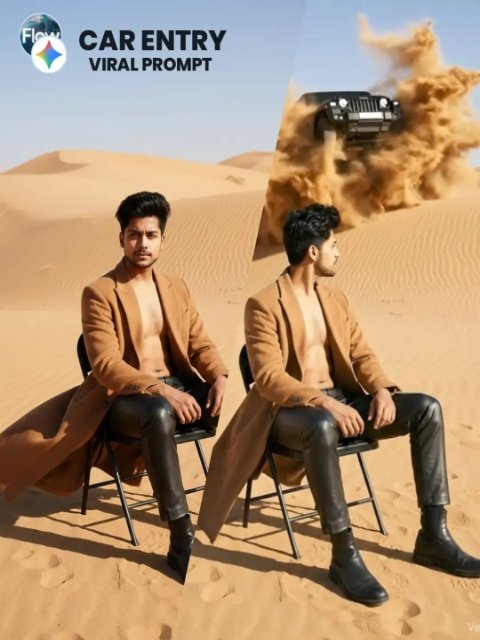
confident young man standing alone on a road. Suddenly a group of multiple Mahindra Thar SUVs arrive one by one from behind and stop near him, forming a stylish convoy. No other people are present.

The man calmly walks toward one of the Thar vehicles, opens the door, sits inside, starts the engine and drives away while the other Thar SUVs remain parked.

Cinematic scene with dramatic entry, realistic environment, natural shadows and reflections. Smooth motion and professional camera movement.

STYLE
Ultra-realistic cinematic video
High-detail environment
Realistic lighting and shadows
Professional movie-style composition

SCENE
Open road environment with a confident young man standing alone in the middle of the road. Multiple Mahindra Thar SUVs arrive from behind sequentially and park near him creating a powerful convoy look.

ACTION
The man confidently walks toward one Thar SUV, opens the driver door, sits inside and drives away while the remaining vehicles stay parked.

LIGHTING
Realistic outdoor lighting with cinematic highlights and dramatic reflections from the vehicles.

CAMERA
Smooth cinematic camera movement, slight low-angle dramatic perspective.

VIDEO QUALITY
Ultra-realistic, 4K / 8K cinematic quality, sharp focus, natural motion blur.

NEGATIVE PROMPT
cartoon style, low quality, blurry video, distorted vehicles, extra people, watermark artifacts
What Is Google Flow AI?
Now let’s talk about Google Flow AI.
As the name suggests, this tool is related to Google and is designed to help with AI-powered video creation. It allows users to easily generate videos from text prompts or images.
With Flow AI, you can create:
- Videos from text prompts
- Videos from images
- Frame-by-frame animated scenes
- Realistic cinematic clips with smooth motion
This means that if you upload a single photo and describe the scene using text, the AI will generate a video based on your description. In the next section, I’ll explain how to create your own video step by step.
Important Note About CapCut Templates
Some CapCut templates may not work in certain regions due to app restrictions. If the template button doesn’t open or respond, try opening it later or access it directly through the official CapCut app.
Please note that external links usually open the original CapCut template in a new tab. We are not officially connected with CapCut. All trademarks and rights belong to their respective owners. The links are only shared to help users access the templates easily.
Thar AI Video Editing Prompt
You can use the following prompt to create a cinematic AI video scene:
Prompt Example
A confident young man stands alone on an empty road. Suddenly, several Mahindra Thar SUVs arrive from behind one by one and stop near him, forming a stylish convoy. No other people are present. The man calmly walks toward one of the Thar vehicles, opens the door, sits inside, starts the engine, and drives away while the other Thar SUVs remain parked. Cinematic atmosphere, realistic lighting, smooth camera motion, dramatic entry, ultra-realistic video.
How to Generate Your AI Video
Follow these simple steps to create your own AI car video:
- Click on the Generate Video option to open the Flow AI website.
- Log in using your email account.
- After logging in, click on Create Project.
- On the dashboard, select the Text option.
- Choose Frame to Video mode.
- Click the + icon to upload your image.
- Copy the prompt provided above and paste it into the text box.
- Finally, click the Generate button.
After a short processing time, the AI will create your video. The result will look highly realistic and cinematic.
Conclusion
Creating cinematic AI videos has become incredibly easy thanks to modern AI tools. With just an image and a simple text prompt, you can generate stunning videos that look almost real.
This viral car-entry style video is a great example of how creative AI editing can make your content stand out on social media. If you want to experiment with new trends and create eye-catching videos, you should definitely try this method.
I hope this guide helps you create your own AI video. If you found this article helpful, feel free to share it with your friends and keep exploring new AI video trends.