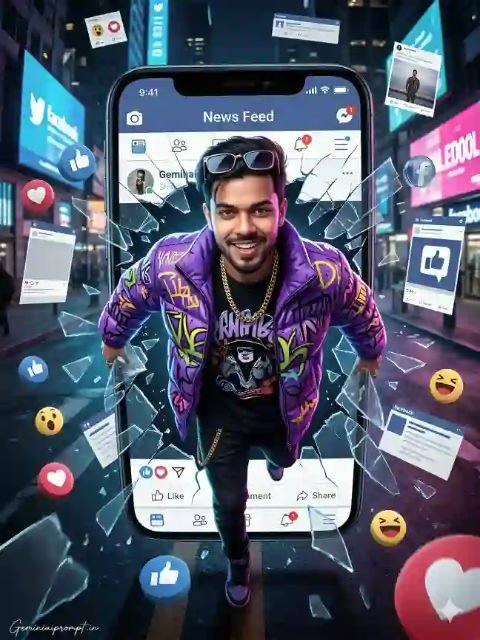
Visual Breakdown :This image uses a depth-of-field effect and 3D manipulation to create a sense of action.
- The Subject: A young man in a vibrant, purple graffiti-style puffer jacket, appearing to physically break through a smartphone screen.
- The Background: A blurred city street at night, filled with neon lights, which keeps the focus entirely on the subject.
- The Elements: Floating social media icons (likes, hearts, laughs) and “shattered glass” fragments are layered in the foreground and background to enhance the 3D depth.
Use uploaded reference face exactly, zero modification)
FACE LOCK — ZERO MODIFICATION POLICY
Face must remain 100% identical to the uploaded reference image.
No reshaping, no beautification filters, no smoothing effects.
Preserve natural facial identity including beard pattern, jawline,
eyes, nose, lips and hairstyle exactly as the reference image.
Ultra-HD crystal-clear facial detail required so the identity
remains perfectly recognizable.
ASPECT RATIO
3:4 vertical
STYLE
Ultra-realistic cinematic digital poster composite.
Modern social-media explosion visual effect.
Professional high-detail 8K photorealistic style.
SCENE DESCRIPTION
Create a dramatic photo composite where a stylish young person
bursts powerfully out of a gigantic cracked Facebook News Feed
screen as if breaking the digital world barrier into reality.
POSE
The person is mid-action, stepping forward from the shattered
Facebook post frame. Both hands push apart the broken edges of
the digital screen as fragments of glass and UI panels explode
outward.
OUTFIT DETAILS
Electric purple graffiti-style puffer jacket layered over a
black graphic t-shirt.
ACCESSORIES
Heavy gold chain
Stylish sunglasses resting on head
EXPRESSION
Confident smile expression with energetic attitude.
SOCIAL MEDIA ELEMENTS
Shattered Facebook reaction icons (Like, Love, Wow, Haha)
flying outward in 3D pieces.
Fragments of broken news feed panels containing profile
pictures, comments, and trending post headlines.
BACKGROUND
Modern city street environment at night with glowing
digital billboards and floating social media screens.
LIGHTING
Mixed lighting from phone screens, neon billboards,
and street lights creating dramatic reflections
and highlights.
CAMERA & STYLE
Top-down fisheye perspective on the subject to
exaggerate scale and create dynamic energy.
NEGATIVE PROMPT
cartoon style, CGI characters, blur,
distorted anatomy, extra limbs, watermark artifacts.
TEXT / SIGNATURE
Add “Geminiaiprompt.in” at the bottom-left corner,
HANDWRITTEN SIGNATURE-STYLE typography,
thin cursive strokes, small size,
subtle premium elegance, white or soft off-white color.
Step-by-Step Editing Process
To create an image like this, you generally need a combination of an AI Image Generator and a Photo Editor (like Photoshop or Canva).
Step 1: AI Image Generation (The Foundation)
Most creators start with a specific prompt in an AI tool (like Gemini or Midjourney).
- The Prompt Strategy: Use keywords like “3D pop-out,” “shattering phone screen,” “vibrant puffer jacket,” and “floating social media emojis.”
- The Setting: Define the background as “nighttime urban street with bokeh neon lights.”
Step 2: Layering and Masking (The 3D Effect)
If you are doing this manually in Photoshop:
- Phone Frame: Place a high-quality PNG of a smartphone.
- The Subject: Place the person behind the phone frame, but use a Layer Mask to allow the head and shoulders to overlap the front of the phone.
- The “News Feed”: Overlay a screenshot of a social media interface onto the phone screen area.
Step 3: Adding Dynamic Elements
- Shattered Glass: Search for “glass shard overlays” with transparent backgrounds. Place them around the edges where the subject is “breaking out.”
- Floating Icons: Add Facebook/Instagram icons. Apply a slight Gaussian Blur to icons that are very close to the “camera” to simulate realistic camera depth.
Step 4: Color Grading and Lighting
- Inner Glow: Add a subtle glow to the edges of the man’s jacket to make it look like the phone screen is casting light on him.
- Saturation: Boost the purples and blues to match the “cyberpunk” aesthetic of the city background.